LangGraph from scratch, part 2: streaming, subgraphs and dynamic fan-out
Part 1 covered the LangGraph mental model up to human-in-the-loop. This part picks up where that one ended. We will get into streaming (both flavours), subgraphs (and when a function is fine), the supervisor pattern for multi-agent setups, and the Send API for fan-out where the number of branches only emerges at runtime.
If you have not read part 1, the quick summary is: state is a row of channels with reducers, nodes return partial updates, edges decide what runs next, .compile() produces a Runnable, and a checkpointer turns the whole thing from a graph library into a stateful runtime. Everything in this post leans on those ideas.
Two streaming methods that do very different things
Every compiled graph implements the Runnable interface, which means you get .invoke(), .stream(), .batch() and .streamEvents() on it for free. The two streaming methods sound similar but give you very different things.
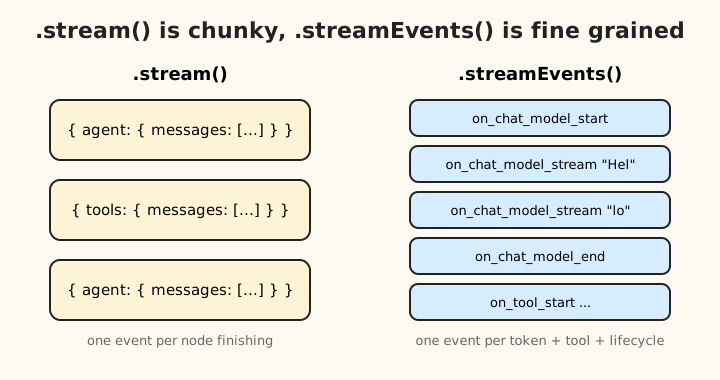
.stream()fires after each node runs. The granularity is the node..streamEvents()fires for every internal event: LLM lifecycle, individual tokens, tool start and end, chain start and end. The granularity is the token.
If you are showing per-step progress in a UI, you want .stream(). If you are streaming tokens into a chat bubble, you want .streamEvents(). People often start with .stream(), get tokens-shaped expectations, and then end up confused when they only see one chunk per node.
.stream() and its modes
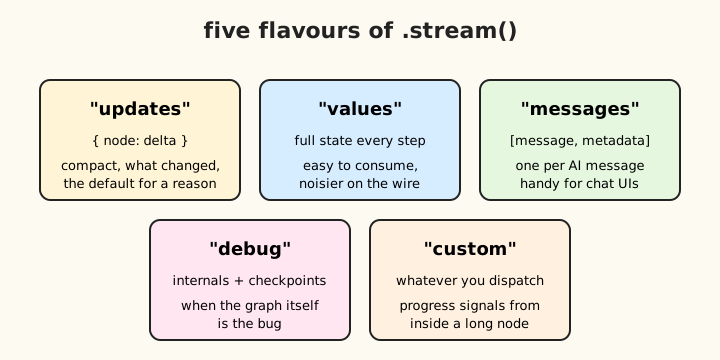
.stream() takes a streamMode config. There are five of them, and the difference between them is just the shape of each chunk.
for await (const chunk of graph.stream(input, config)) {
  // chunk shape depends on streamMode
}
| Mode | Shape | When to use |
|---|---|---|
"updates" (default) |
{ nodeName: partialUpdate } |
Show “what did this node return” progress |
"values" |
full state at this step | Easier to consume, but bigger on the wire |
"messages" |
[message, metadata] for each AI message |
Chat UIs that want each AI message as it appears |
"debug" |
low-level internals: checkpoints, tasks | When the graph itself is the bug |
"custom" |
whatever you dispatch yourself | Custom progress signals from inside a long node |
You can pass an array of modes if you want more than one:
for await (const chunk of graph.stream(input, { ...config, streamMode: ["updates", "values"] })) {
  const [mode, data] = chunk;
}
In practice I use "updates" for almost everything. It is compact and tells you which node produced what, which is the question I usually want answered.
.streamEvents() and the token firehose
.streamEvents() is the one for chat UIs. It emits a structured event for every interesting thing that happens inside the run.
for await (const ev of graph.streamEvents(input, { ...config, version: "v2" })) {
  // ev = { event, name, data, metadata, tags, run_id }
}
Always pass version: "v2". The v1 shape is older and slightly different, and any tutorial that does not pass it is probably giving you advice from before v2 landed.
The event types you actually use:
on_chat_model_startandon_chat_model_endfor LLM lifecycleon_chat_model_streamfor per-token streamingon_tool_startandon_tool_endfor tool execution
A token-streaming chat UI looks like this:
for await (const ev of graph.streamEvents(input, { ...config, version: "v2" })) {
  if (ev.event === "on_chat_model_stream" && ev.metadata?.langgraph_node === "agent") {
    yield ev.data.chunk.content;
  }
  if (ev.event === "on_tool_start") {
    yield `\n[Calling ${ev.name}...]\n`;
  }
  if (ev.event === "on_tool_end") {
    yield `[Done]\n`;
  }
}
Two things to notice. First, you almost always want to filter. The raw stream is verbose, and most of the events are not the ones you care about. Filter by event first, then narrow further with metadata.langgraph_node, name, or tags. Second, the metadata.langgraph_node === "agent" check is doing real work: in a multi-LLM graph you usually only want to drive the UI from one of them.
If you are seeing nothing in your stream, the usual culprits are:
- Forgot
version: "v2". - Filtered out the events you actually wanted. Console-log raw events first, then add filters.
- Used
.stream()and expected tokens. Tokens arestreamEventsterritory. - Subgraph nodes invisible to
.stream(). Passsubgraphs: true.
Custom events from inside a node
If a node does long work and you want to surface progress before it finishes, dispatch your own events:
import { dispatchCustomEvent } from "@langchain/core/callbacks/dispatch";

const myNode = async (state) => {
  await dispatchCustomEvent("progress", { step: 1, total: 5 });
  // ...
  await dispatchCustomEvent("progress", { step: 5, total: 5 });
};
Catch them with streamMode: "custom" or via streamEvents (event === "on_custom_event"). This is the right move for “downloaded 3 of 10 files” indicators, where neither node-level nor token-level granularity is what you want.
Streaming and interrupts play nicely
When the graph hits an interrupt(), the stream ends gracefully. You do not get a broken-stream error. You see an __interrupt__ event in the final chunk, then the iterator finishes. To resume, start a new stream or invoke with Command({ resume }). This is genuinely lovely once you have built one of these flows.
Subgraphs
A subgraph is a compiled StateGraph used as a node inside another StateGraph. There is no special “subgraph API”. Compilation produces a Runnable, addNode accepts any Runnable, and that is the entire trick.
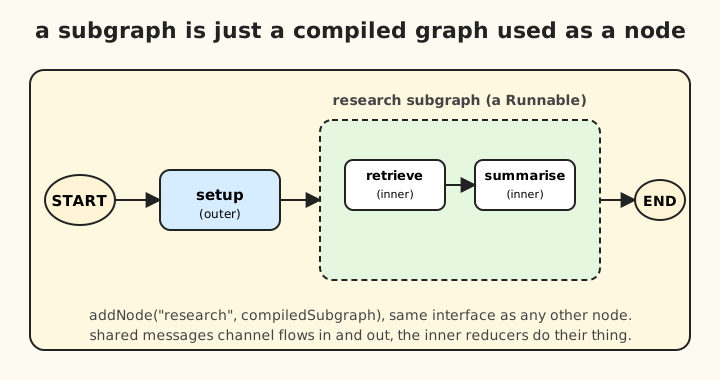
The reason to reach for one:
- Modularity. Pull a self-contained capability (a RAG pipeline, a tool-calling agent, an evaluator loop) out into its own thing and reuse it.
- Encapsulation. The inner graph manages its own state shape. The outer graph does not need to know.
- Independent deployment. The same subgraph can be compiled with different checkpointers, used standalone, or wired into a different parent.
- Multi-agent setups. Each agent is a subgraph, the outer graph routes between them. We will see this pattern in a moment.
Shared schema is the easy case
If parent and subgraph share a state shape (or share keys with the same channels), state passes through transparently. The subgraph reads and writes channels by name, and updates merge back through the parent’s reducers without any glue:
const innerGraph = new StateGraph(MessagesAnnotation)
  .addNode("agent", callModel)
  .addEdge(START, "agent")
  .addEdge("agent", END)
  .compile();

const outerGraph = new StateGraph(MessagesAnnotation)
  .addNode("inner", innerGraph)
  .addEdge(START, "inner")
  .addEdge("inner", END)
  .compile();
messages flows in, the subgraph appends to it, the outer state ends up with the merged result. Zero glue.
Different schemas need a translator
When the shapes are different, wrap the subgraph in a node function that does the I/O mapping yourself:
const innerGraph = new StateGraph(InnerState).addNode(/* ... */).compile();

const outerGraph = new StateGraph(OuterState)
  .addNode("translator", async (state: OuterState) => {
    const innerInput = { query: state.userQuestion };
    const innerResult = await innerGraph.invoke(innerInput);
    return { answer: innerResult.finalAnswer };
  })
  .compile();
More code, but you get full control. This is the right pattern when the same subgraph gets reused across very different parents.
Don’t compile the subgraph with its own checkpointer
When you use a subgraph as a node in a parent, only the outermost graph gets a checkpointer. The subgraph inherits the parent’s automatically. If you compile both with checkpointers, you will end up with state being saved twice, in confusing ways, and you will hate debugging it. I have done this. Avoid it.
State history reflects the nesting. getStateHistory on the parent shows steps including subgraph execution. To inspect the subgraph’s own internal checkpoints, request subgraphs: true:
for await (const snap of app.getStateHistory(config, { subgraphs: true })) {
  // snap.tasks[i].state shows nested subgraph state
}
Same flag works on .stream():
for await (const chunk of graph.stream(input, { ...config, subgraphs: true })) {
  // chunk = [["outer", "inner"], { innerNode: update }]
}
The first element is a namespace tuple showing the path through nested graphs. Useful when you want a chat UI to surface “the supervisor delegated to the researcher, who is now calling a search tool” rather than just “something is happening”.
When a subgraph is overkill
The temptation, looking at all this, is to ask whether you should just call a function from inside a node instead. Often yes. Two reasons to reach for a subgraph rather than a function:
- Checkpointing and resumability. A function call is atomic. You cannot resume halfway through it. A subgraph’s nodes each get their own checkpoint, so HITL, crash recovery and streaming all work inside it.
- The subgraph is itself usable standalone. A function is bound to its caller. A compiled subgraph can be invoked, streamed, deployed independently, or wired into a different parent.
If you do not need either of those, write a function. Subgraphs are not free, they add a layer of state mapping and execution overhead, and they will make your traces noisier than they need to be.
The supervisor pattern
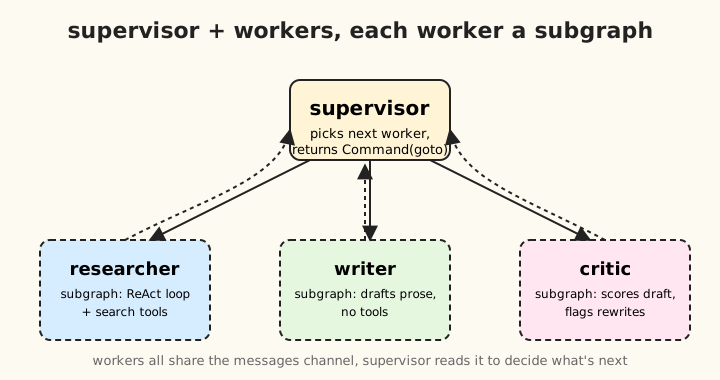
The cleanest multi-agent pattern, and the one I keep coming back to, is supervisor-plus-workers. Each worker is a compiled subgraph with its own ReAct loop and tools. A supervisor node calls an LLM to decide who runs next.
const supervisor = async (state) => {
  const decision = await routerModel.invoke([
    { role: "system", content: "Pick: researcher | writer | critic | END" },
    ...state.messages,
  ]);
  const next = parseDecision(decision);
  return new Command({ goto: next });
};

const graph = new StateGraph(MessagesAnnotation)
  .addNode("supervisor", supervisor)
  .addNode("researcher", researcherSubgraph)
  .addNode("writer", writerSubgraph)
  .addNode("critic", criticSubgraph)
  .addEdge(START, "supervisor")
  .addEdge("researcher", "supervisor")
  .addEdge("writer", "supervisor")
  .addEdge("critic", "supervisor")
  .compile({ checkpointer });
The supervisor returns a Command({ goto: agentName }), which jumps execution to that node bypassing the static edges. All workers share the messages channel, so context flows through naturally and the supervisor reads the running history to decide what is next.
Command does several useful things, goto is just one of them:
new Command({
  resume: value,            // for HITL, like in part 1
  update: { x: 1 },         // also write something to state
  goto: "someNode",         // jump to a node, bypass edges
});
If you find yourself building this exact pattern by hand, the prebuilt @langchain/langgraph-supervisor packages it up for you. Worth a look before you handcraft the third one.
The Send API: dynamic fan-out
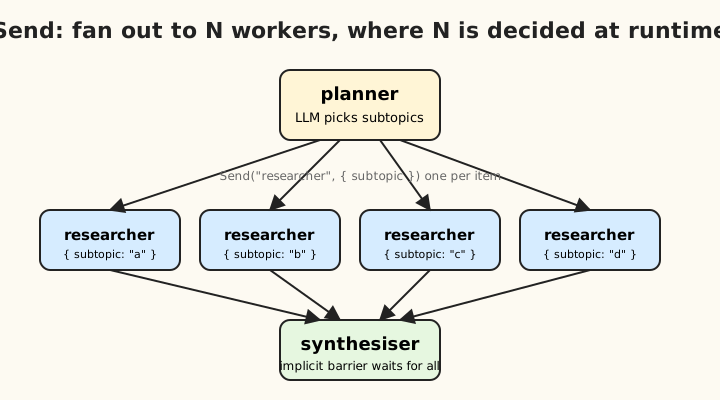
Everything we have looked at so far has known its shape at graph-definition time. You define the nodes and edges in code, you ship the graph, the structure is fixed. The Send API is the answer to the question “what if I do not know how many parallel branches I need until an LLM tells me?”
This is the missing piece for map-reduce, parallel research (“research each of these five sub-questions”), and any case where the number of branches is decided at runtime.
How it works
Send is returned from a conditional edge function instead of a node name:
import { Send } from "@langchain/langgraph";

.addConditionalEdges("planner", (state) => {
  return state.subtasks.map(task => new Send("worker", { task }));
}, ["worker"])
What happens when LangGraph sees an array of Send objects:
- Each
Send("nodeName", input)schedules one execution ofnodeNamewith the given input - All of them run in parallel
- Each parallel execution sees only what you passed in (scoped state)
- When they all finish, their state updates merge back via the parent’s reducers
- The downstream node acts as an implicit barrier and waits for all of them
The map-reduce shape, end to end
import { Annotation, StateGraph, Send, START, END } from "@langchain/langgraph";

const State = Annotation.Root({
  topic: Annotation<string>(),
  subtopics: Annotation<string[]>(),
  research: Annotation<string[]>({
    reducer: (a, b) => a.concat(b),
    default: () => [],
  }),
  finalReport: Annotation<string>(),
});

const planner = async (state) => {
  const subtopics = await model.invoke(`Break "${state.topic}" into subtopics`);
  return { subtopics: parseList(subtopics) };
};

const researcher = async (state: { subtopic: string }) => {
  // scoped state: only sees what Send passed in
  const findings = await model.invoke(`Research: ${state.subtopic}`);
  return { research: [findings] };  // gets concatenated via reducer
};

const synthesiser = async (state) => {
  return { finalReport: await model.invoke(`Synthesise: ${state.research}`) };
};

const graph = new StateGraph(State)
  .addNode("planner", planner)
  .addNode("researcher", researcher)
  .addNode("synthesiser", synthesiser)
  .addEdge(START, "planner")
  .addConditionalEdges("planner", (state) =>
    state.subtopics.map(s => new Send("researcher", { subtopic: s })),
    ["researcher"],
  )
  .addEdge("researcher", "synthesiser")
  .addEdge("synthesiser", END)
  .compile();
Three things worth pointing out:
- The conditional edge returns
Send[]instead of a string. LangGraph distinguishes by type. - Each worker sees only the scoped input you passed it. The researcher does not see
state.topicunless you explicitly pass it in theSendpayload. - The downstream node is an implicit barrier. LangGraph waits for all parallel researchers to finish before running
synthesiser. Theirresearch: [...]updates accumulate via the concat reducer.
Workers can have their own state shape
Because the worker only sees what you Send it, you can give it a totally different state type than the parent. This is great for narrow, reusable workers. The trade is that they cannot read parent state unless you put it in the payload.
If branches need shared context, pass it in the payload. If you find yourself stuffing the entire parent state in there, that is a hint that maybe the work is not as independent as you thought.
Mixing routing and Send
A conditional edge can return either a string or an array of Sends. So you can express “based on state, sometimes route to one place, sometimes fan out”:
.addConditionalEdges("classifier", (state) => {
  if (state.tasks.length === 0) return END;
  if (state.tasks.length === 1) return "single_worker";
  return state.tasks.map(t => new Send("parallel_worker", { task: t }));
})
This is one of those primitives that looks small in isolation and turns out to be exactly what you need most of the time.
Send plus subgraphs
The target of a Send is a single node, but that node can be a compiled subgraph. So fan-out across N runs of an entire sub-pipeline is one line of glue:
.addNode("research_pipeline", compiledResearchSubgraph)
.addConditionalEdges("planner", (state) =>
  state.queries.map(q => new Send("research_pipeline", { query: q })),
  ["research_pipeline"],
)
This is how you compose map-reduce over multi-step capabilities. It is also where the design starts to feel genuinely powerful. A planner LLM produces a list, you fan out to a non-trivial pipeline per item, you collect and synthesise. All of that is around 30 lines of TypeScript.
The Send footguns
- Forgetting the third arg to
addConditionalEdges. Functionally optional but worth including, it makes graph visualisation correct and helps the type system. - Trying to read parent state from inside a worker. The worker only sees what you sent it. If you want
state.topic, pass it in the payload. - Reducer choice on the merged channel matters a lot. If your worker returns
{ research: findings }andresearchdoes not have a concat reducer, parallel workers will overwrite each other and you will lose all but one result. This is the most common Send mistake. Same family of bug as forgettingmessagesStateReducerfrom part 1. - Each
Sendbranch consumes one super-step in the checkpoint history. Long fan-outs make the state history bigger.
Where this leaves us
Across both parts you have now seen:
- the four primitives of
StateGraph, and the channel-and-reducer model that underpins them - conditional edges as the routing primitive
- checkpointers, threads, and what you get for free once you add them
interrupt()for pause-and-resume across processes- two flavours of streaming, and which one to use when
- subgraphs as just compiled
Runnables, and the supervisor pattern they enable Sendfor fan-out where the count is dynamic
That is enough to build basically anything that LangGraph is the right tool for. The thing that stuck with me most after using it for a while is that the surface area is much smaller than the marketing implies. State, nodes, edges, compile. Add a checkpointer when you want persistence. Add interrupt() when you want a human in the loop. Use subgraphs when you really need them and a function otherwise. Reach for Send when N is dynamic. Stream at the right granularity for the audience.
Most of the difficulty I see people hit, including me, is one of about three bugs: forgetting a reducer on a list channel, forgetting the checkpointer, or trying to read parent state from inside a Send branch. Once those three are wired into your reflexes, the rest of LangGraph mostly does what you expect.
If you want to play with any of this, the prebuilts are a good place to start. createReactAgent for tool-using agents. @langchain/langgraph-supervisor for multi-agent. MemorySaver while you are prototyping, PostgresSaver the moment you ship. Then if those run out of road, you have everything in these two posts to reach for.