LangGraph from scratch, part 1: state, graphs and humans in the loop
I have been building agents with LangGraph for a while now. Long enough that the bits I found weird at first feel obvious in retrospect, and long enough to know which bits everyone gets bitten by on the way in. This is part 1 of a short series where I try to explain LangGraph the way I wish someone had explained it to me, instead of the way the docs explain it, which is correct but assumes you already know what a “channel” is and why you should care.
Everything in this post is in TypeScript. I work in @langchain/langgraph. The Python API is similar but not identical, and a lot of the tutorials floating around assume Python and quietly use things like add_messages that do not exist on the JS side. If you find yourself reaching for something that only exists in Python, that is the signal to stop and check.
This part covers the why, the model of state, the four primitives that make up a StateGraph, persistence with checkpointers, and human-in-the-loop with interrupt(). Part 2 will get into streaming, subgraphs and the Send API.
Where LangGraph sits
The first thing that confused me was just placing LangGraph in the LangChain universe. There are a lot of products with similar names and they do not all do the same thing.
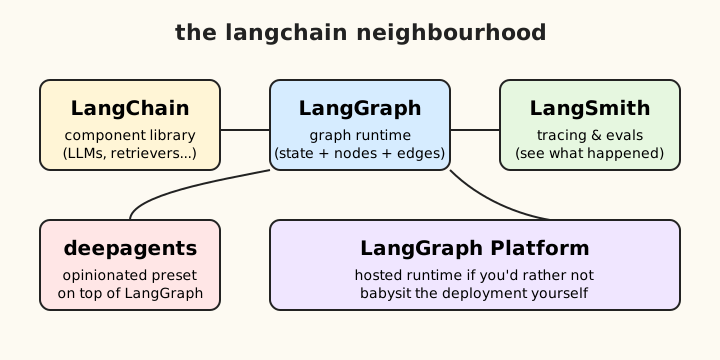
The mental model that helped me:
- LangChain is a component library. It gives you common interfaces over models, retrievers, vector stores, output parsers. Useful, but it does not run anything for you.
- LangGraph is a runtime. It is the thing that actually executes a multi-step agent or workflow, with state, branching and persistence.
- LangSmith is the tracing and eval product. Independent of both. You can use it with anything.
- deepagents is an opinionated preset built on top of LangGraph. It bakes in a planner, sub-agents and a virtual filesystem, and gives you something Claude-Code-shaped without you designing it yourself.
- LangGraph Platform is a hosted runtime if you would rather not babysit your own deployment.
Whenever you see these names mixed up in a blog post, hold this picture in your head: LangChain is the parts catalogue, LangGraph is the engine.
Why LangGraph exists
The original LangChain AgentExecutor was a hidden while-loop. You handed it a model, some tools and a prompt, called .run() and crossed your fingers. It worked surprisingly well for demo-shaped problems and got progressively more painful as you tried to do real things with it. The loop was inside the framework, so you could not:
- inspect or modify state mid-run
- branch on anything more interesting than “did the model ask for a tool”
- pause and resume, for example to wait for a human to approve something
- persist state across runs in a sensible way
- compose multiple agents together without it turning into a nest of callbacks
LangGraph replaces that hidden loop with an explicit graph that you build, inspect and run. It is the same idea as moving from a black-box workflow engine to writing your own state machine, except the state machine is the natural unit of an agent.
I will not labour the workflows-vs-agents distinction much because it is a thin one. Both are graphs. The difference is who decides which edge to take next. In a workflow, you do, in code. In an agent, the model does, at runtime. LangGraph expresses both with the same primitives.
The ReAct loop is just a tiny graph
Almost every agent you have ever seen is a variant of the ReAct loop. Call the model, see if it asked for a tool, if so run the tool, feed the result back, repeat. If you draw it, it is two nodes in a circle.
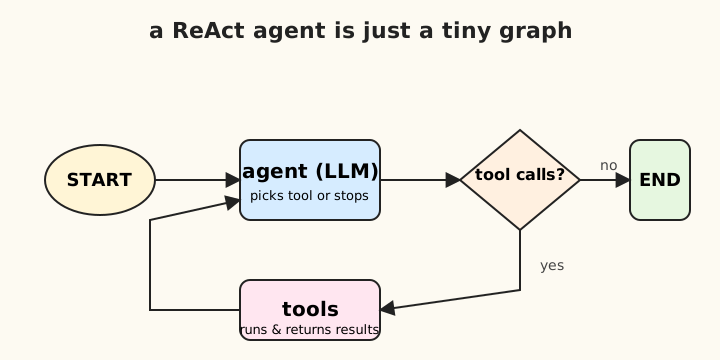
This is so common that LangGraph ships createReactAgent() as a one-liner. Under the hood it builds the graph above. Reach for createReactAgent first when you need a tool-using agent and nothing else. Only drop down to a StateGraph when you need something the prebuilt cannot express, like custom state, branching that is not just “tools or end”, parallel work, or pausing for a human.
StateGraph: four primitives, then you are done
A StateGraph has four primitives. Once you understand them, the rest is just combinations.
- State, defined as a schema of channels with reducers
- Nodes, which are functions that read state and return a partial update
- Edges, which decide where execution goes next
- Compilation, which turns the builder into something you can actually invoke
Here is the simplest possible graph in TypeScript:
import { StateGraph, START, END, MessagesAnnotation } from "@langchain/langgraph";
import { ChatAnthropic } from "@langchain/anthropic";

const model = new ChatAnthropic({ model: "claude-sonnet-4-6" });

const graph = new StateGraph(MessagesAnnotation)
  .addNode("agent", async (state) => {
    const response = await model.invoke(state.messages);
    return { messages: [response] };
  })
  .addEdge(START, "agent")
  .addEdge("agent", END)
  .compile();

const result = await graph.invoke({
  messages: [{ role: "user", content: "Hello" }],
});
That is the whole shape of every graph you will write. Define a schema, add nodes, wire edges, compile, invoke. Everything else in this post is unpacking what each of those steps actually means.
State is a row of channels, not a single object
This is the part that took me the longest to internalise, and once it clicked, half of LangGraph stopped feeling weird.
State is not a single blob you pass around. It is a set of named channels, each with its own merge rule. When a node returns a partial update, LangGraph looks at each key in the returned object, finds the corresponding channel, and asks that channel’s reducer how to combine the new value with the old one.
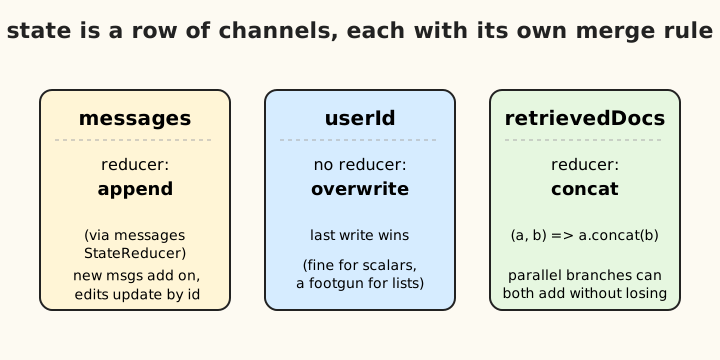
A reducer is just (current, update) => merged. Some examples:
| Reducer | What it does |
|---|---|
| None (the default) | Overwrites |
(a, b) => a.concat(b) |
Concatenates lists |
messagesStateReducer |
Appends new messages, edits existing ones by id |
| Whatever you want | Whatever you want |
The single biggest footgun in LangGraph is having an array channel without a reducer. You write a node that returns { messages: [newMsg] }, you expect it to append, and instead it overwrites and you lose the conversation history. If your channel is a list, you almost certainly want a concat reducer or messagesStateReducer.
In TypeScript you define state with the Annotation builder:
import { Annotation, messagesStateReducer } from "@langchain/langgraph";
import type { BaseMessage } from "@langchain/core/messages";

const StateAnnotation = Annotation.Root({
  messages: Annotation<BaseMessage[]>({
    reducer: messagesStateReducer,
    default: () => [],
  }),
  userId: Annotation<string>(),
  retrievedDocs: Annotation<string[]>({
    reducer: (current, update) => current.concat(update),
    default: () => [],
  }),
});

type State = typeof StateAnnotation.State;
MessagesAnnotation you saw earlier is just a prebuilt schema with one channel called messages configured with the right reducer. You can use it as your whole schema if all you have is a chat history, or spread it into your own:
const MyState = Annotation.Root({
  ...MessagesAnnotation.spec,
  userId: Annotation<string>(),
});
Why nodes return partial updates
People coming from React or Redux often ask why nodes do not just return the whole new state. There are good reasons.
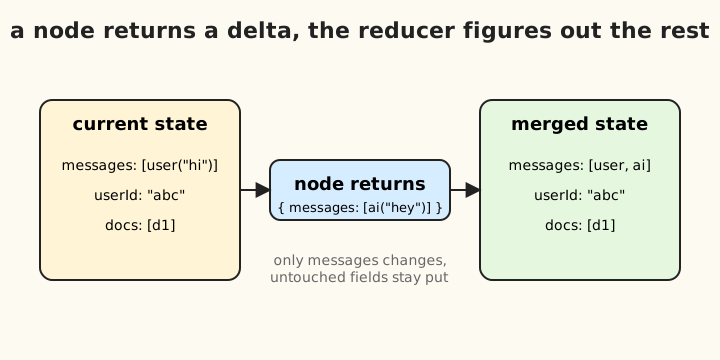
- Reducers need a delta to merge. If you returned the whole state, there would be nothing to merge, it would just be an overwrite.
- Two parallel branches both returning
{ messages: [...] }get combined by the reducer instead of racing. With full-state returns the last writer would win. .stream()can emit one event per node containing only what that node changed, because that is what nodes actually emit.- Node code stays readable.
return { messages: [response] }is a lot less error-prone than spreading the entire previous state every time.
So the rule of thumb when writing a node is: read whatever you want from state, return only what you want to change.
Nodes
A node is just a function. (state) => Partial<Update>, async or sync, anything goes inside. LLM calls, database writes, file IO, calls to other services. The only rules are read whatever you want from state, do not mutate state directly, and return a partial update.
const retrieveNode = async (state: typeof MyState.State) => {
  const docs = await vectorStore.search(state.query);
  return { retrievedDocs: docs };
};
That is it. Nothing magical.
Edges
Edges decide what runs next. There are three flavours.
Static edges are the boring deterministic kind. Go from A to B every time.
.addEdge("retrieve", "generate")
Conditional edges look at state and decide. This is how routing and agent loops work.
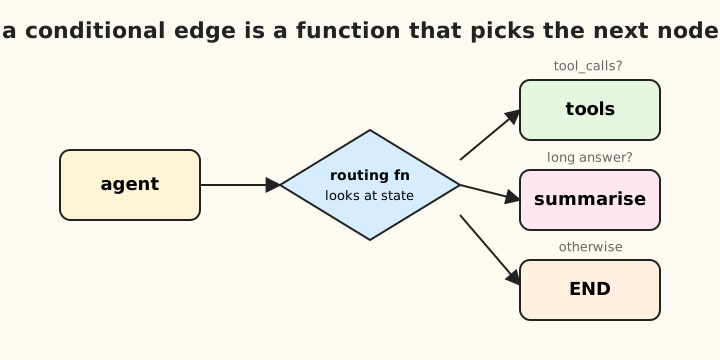
.addConditionalEdges(
  "agent",
  (state) => {
    const last = state.messages.at(-1);
    return last?.tool_calls?.length ? "tools" : END;
  },
  ["tools", END],
)
The third argument is technically optional, but I always pass it. It makes graph visualisation correct and helps the type system know what targets are possible.
Parallel edges are just multiple addEdge calls from the same source. The targets run concurrently and their state updates merge via the reducers.
.addEdge("planner", "researcher")
.addEdge("planner", "summariser")
Whether the merge does what you want depends entirely on the reducers on the channels they write to. If both branches write to messages and messages has messagesStateReducer, you get both messages appended. If you forget the reducer you get whichever one finished last. Same footgun, different angle.
Compilation
.compile() does three things:
- validates the graph (no orphan nodes, every path leads to
END) - optionally accepts a checkpointer for persistence (more on that in a moment)
- returns a
CompiledStateGraphthat implements LangChain’sRunnableinterface
That last bit is a bigger deal than it first looks. Because a compiled graph is a Runnable, it has the same shape as a single LLM call: .invoke(), .stream(), .batch(), .streamEvents(). So you can feed a graph into something that expects an LLM, you can use one graph as a node inside another graph, and tracing tools like LangSmith just work.
The way I think about it: the StateGraph is the recipe, .compile() cooks it, and what you get back is the same kind of object as every other LangChain primitive. Just bigger.
A real example: the ReAct loop, by hand
Putting it together, here is what createReactAgent actually builds for you:
import { StateGraph, START, END, MessagesAnnotation } from "@langchain/langgraph";
import { ToolNode } from "@langchain/langgraph/prebuilt";
import { ChatAnthropic } from "@langchain/anthropic";

const tools = [/* your tool defs */];
const model = new ChatAnthropic({ model: "claude-sonnet-4-6" }).bindTools(tools);

const callModel = async (state: typeof MessagesAnnotation.State) => {
  const response = await model.invoke(state.messages);
  return { messages: [response] };
};

const shouldContinue = (state: typeof MessagesAnnotation.State) => {
  const last = state.messages.at(-1);
  return last?.tool_calls?.length ? "tools" : END;
};

const graph = new StateGraph(MessagesAnnotation)
  .addNode("agent", callModel)
  .addNode("tools", new ToolNode(tools))
  .addEdge(START, "agent")
  .addConditionalEdges("agent", shouldContinue, ["tools", END])
  .addEdge("tools", "agent")
  .compile();
That is it. The agent runs until the model stops asking for tools. Two nodes, one conditional edge, one loop-back edge.
Checkpointers turn a graph into a stateful runtime
Everything up to now has been one-shot. You invoke the graph, it runs, you get a result, the state is gone. That is fine for a calculator. It is not fine for a chat. The thing that makes LangGraph stateful is checkpointers.
A checkpointer is a piece of storage that LangGraph writes to after every node runs. It saves a full snapshot of state, grouped by thread. A thread is a conversation, a session, a run, whatever you want it to be, as long as it has a stable id.
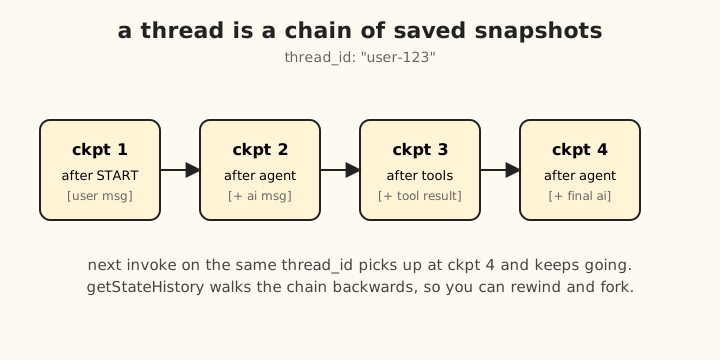
Once you have a checkpointer, you get a pile of things basically for free:
- multi-turn conversations, because new input gets appended to the existing thread state via reducers
- crash recovery, because you can resume from the last checkpoint
- human-in-the-loop, because you can pause and come back later
- time travel, because you can re-run from any past checkpoint
- inspection, because you have the full state history sat there waiting to be read
Adding one is two lines:
import { MemorySaver } from "@langchain/langgraph";

const checkpointer = new MemorySaver();
const app = graph.compile({ checkpointer });

const config = { configurable: { thread_id: "user-123" } };

await app.invoke({ messages: [new HumanMessage("hi")] }, config);
await app.invoke({ messages: [new HumanMessage("how are you?")] }, config);
The second invoke does not pass the first message back in. It does not need to. The thread already has it. You just append the next user message and the reducer figures out the rest.
The two debugging questions you will hit on day two:
- My second invoke does not see the first message. Either you forgot the checkpointer, or you passed a different
thread_idand got a fresh thread. - I lose state when I scale to multiple workers. You used
MemorySaver, which is in-process. Swap it forPostgresSaver(orSqliteSaverif you really are running on one machine). I have done this on day one of every real project. I recommend doing the same.
If you want preferences and facts to persist across conversations, that is a separate thing called the Store. The checkpointer is per-thread. The Store is across threads. Two-level memory, which is a nice mirror of how humans work, where checkpointer is “what just happened in this conversation” and the store is “what we know about this user”.
Human-in-the-loop with interrupt()
This is my favourite feature, and it is the one that finally convinced me LangGraph was built by people who had actually shipped agents.
Sometimes you want a node to stop, get a human to look at something, and only continue once they have responded. The naive approach of “use a callback” or “spin up a separate queue” gets nasty very quickly because you have to think about what happens to the rest of the graph in the meantime. LangGraph has a much nicer answer: pause the graph, persist its state, hand control back to the caller. Resume whenever you like, even from a different process.
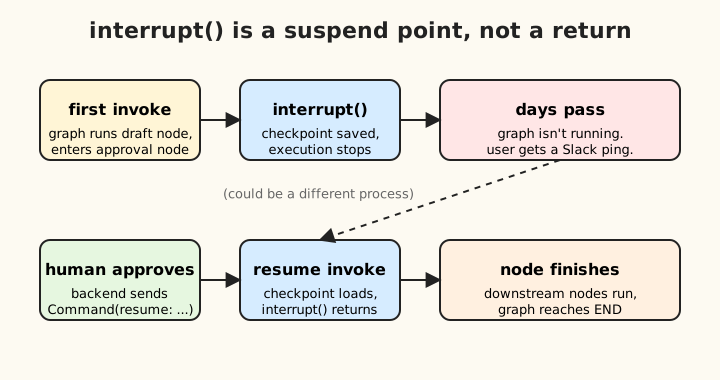
There are two pieces:
interrupt(value)is called inside a node. It throws a signal that LangGraph catches. The graph saves a checkpoint, stops running, and returns thevalueto the caller asresult.__interrupt__.new Command({ resume: value })is what you pass to.invoke()later to continue. The originalinterrupt()call returnsvalue, the node continues, and the graph runs on.
The cleanest way to see it is a draft-and-approval flow:
import {
  StateGraph, START, END, MessagesAnnotation,
  MemorySaver, interrupt, Command,
} from "@langchain/langgraph";

const graph = new StateGraph(MessagesAnnotation)
  .addNode("draft", async (state) => {
    const draft = await model.invoke(state.messages);
    return { messages: [draft] };
  })
  .addNode("approval", async (state) => {
    const lastMsg = state.messages.at(-1);
    const decision = interrupt({
      question: "Approve this draft?",
      draft: lastMsg.content,
    });
    return decision.approved
      ? { messages: [new AIMessage("Sent: " + lastMsg.content)] }
      : { messages: [new AIMessage("Cancelled.")] };
  })
  .addEdge(START, "draft")
  .addEdge("draft", "approval")
  .addEdge("approval", END)
  .compile({ checkpointer: new MemorySaver() });

const config = { configurable: { thread_id: "convo-1" } };

const result1 = await graph.invoke(
  { messages: [new HumanMessage("draft a tweet")] },
  config,
);
console.log(result1.__interrupt__);

// time passes, human reviews on a phone, in Slack, wherever

await graph.invoke(new Command({ resume: { approved: true } }), config);
The detail that does not jump out at you from the code is that the first invoke and the second invoke can be in completely different processes. The thread_id plus the checkpointer is the only thing connecting them. That is what unlocks the “user gets a Slack notification, approves it from their phone three days later” pattern, without any extra infrastructure.
A few gotchas I have hit, none of them dealbreakers, all of them obvious once you have been bitten:
- No checkpointer means no interrupt. You will get a runtime error.
interrupt()is built directly on top of checkpoint persistence. - The whole node function runs again on resume. The
interrupt()call looks like a synchronous return, but it really is a suspend point. Anything before theinterrupt()runs on the first call AND on the resume. If you have side effects up there, you will fire them twice. Either move them after theinterrupt(), or make them idempotent. - The resume value comes via the function return, not via state. If you want it in state, you have to put it there yourself:
return { messages: [new HumanMessage(decision)] }. - Multiple interrupts in one node pause separately. Each
Command({ resume })answers the next pending one.
Command does a couple of other interesting things which I will get into in part 2 when we talk about multi-agent setups, but resume is the one you reach for first.
Where this leaves us
If you have followed along this far, you have everything you need to build a useful agent:
- a four-primitive mental model of
StateGraph - a clear picture of why state is channels with reducers, and the failure mode of forgetting that
- conditional edges, which are basically the only routing primitive you ever need
- checkpointers, which are the difference between a toy and a thing you can put on the internet
- human-in-the-loop, which is the difference between an agent that automates work and one that you trust enough to actually let near it
Part 2 picks up with streaming (both node-level and token-level), subgraphs (when to use them and when a function is fine), and the Send API for dynamic fan-out. If you want a sneak preview, the trick is the same one as everything else in this post: it is just channels and reducers.